モデルの詳細
Revo MAX Zonal Exposure Alignment Grids
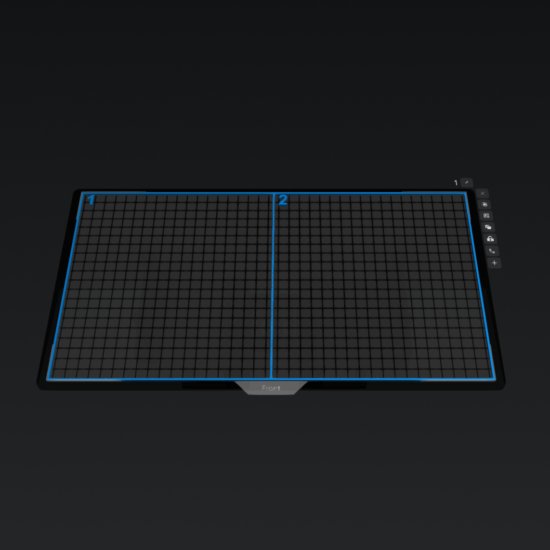
Revo MAX Zonal Exposure supports custom test models and lets each zone use different exposure settings to suit the resin and print requirements.
Import an alignment grid into the slicer to position test models in the intended exposure zones. Compare the results of different exposure settings in a single print.
The download includes three alignment grids for 2-zone, 4-zone, and 8-zone configurations.
For alignment only. Remove the grid before slicing the test models.
File Information
- Included Files: 3 STL files
- Zone Configurations: 2-zone, 4-zone, and 8-zone
- Compatible Printer: Sonic Mighty Revo 16K MAX
See the YouTube tutorial for the full workflow.
---------------------------------------------------------------------------------------
Revo MAX 分區曝光對位格線
這組對位格線專為 Revo MAX 分區曝光功能設計,不再受到機台預設測試模型與參數的限制,可依照不同樹脂與列印需求,自行準備測試模型並調整各區的曝光設定。
將格線匯入切片軟體後,即可確認各個曝光區域的位置,排列自訂測試模型,並透過單次測試比較不同曝光參數的列印結果,讓參數測試更靈活、更有效率。
下載內容包含 3 款對位格線,分別對應 2 區、4 區及 8 區的分區配置,可依照測試需求選擇使用。
對位格線僅供切片前確認模型位置,無須列印。完成對位後,請先移除格線,再進行切片。
檔案資訊
- 檔案數量:3 個 STL
- 分區配置:2 區、4 區及 8 區
- 適用機型:Sonic Mighty Revo 16K MAX
- 使用方式:僅供模型對位,無須列印
詳細操作方式請參考 YouTube 教學影片。